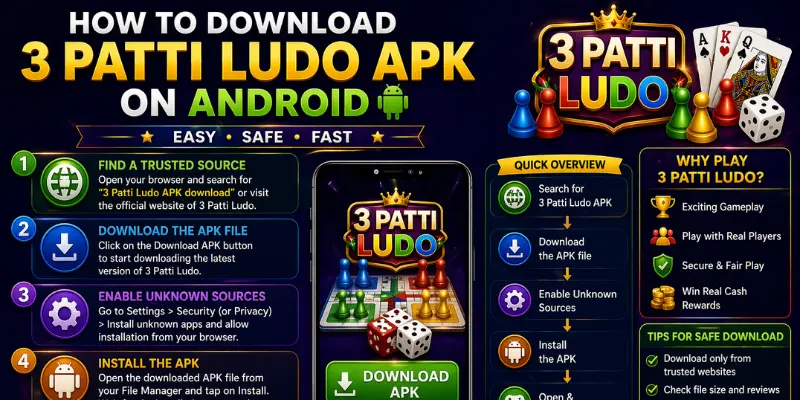
Downloading apps from outside the Google Play Store requires a few extra steps — but it's perfectly safe when done correctly. 3 Patti Ludo distributes its official APK directly because the Play Store's policies restrict real-money gaming apps in certain regions. This guide walks you through every step safely.
01What You Need Before You Start
- An Android smartphone running Android 5.0 (Lollipop) or higher.
- At least 100 MB of free storage (the APK is ~45 MB; installed app is ~85 MB).
- A stable internet connection — Wi-Fi recommended for first download.
- A JazzCash or EasyPaisa account ready for your first deposit.
02Step 1: Enable Installation from Unknown Sources
Android blocks APK installation from outside the Play Store by default. To enable it: Open Settings → Security (or Privacy) → Enable 'Install unknown apps' or 'Unknown sources'. On newer Android (8.0+), you enable this per-app — you'll be prompted automatically when you try to install.
03Step 2: Download the Official APK
Only download from the official 3 Patti Ludo website (this site). Tap the 'Download APK' button and wait for the file to appear in your notifications bar. The file will be named something like 3PattiLudo_v5.2.1.apk.
04Step 3: Install the APK
Open your Downloads folder (or tap the notification), then tap the APK file. Android will ask for confirmation. Review the permissions requested — the app needs Storage (for updates), Network (for gameplay), and Camera (for KYC verification). Tap Install and wait 30-60 seconds.
05Step 4: Register Your Account
Open the app and tap Register. Enter your Pakistani mobile number and you'll receive an OTP via SMS. Verify it, create a password, and your account is live in under 2 minutes.
06Step 5: Claim Your Welcome Bonus
New accounts receive a welcome bonus automatically — typically bonus chips worth PKR 100-500. Navigate to Wallet > Bonuses to claim it. This bonus can be used immediately on any game, giving you a free trial before your first real deposit.
07Troubleshooting Common Installation Issues
- 'App not installed' error: Free up more storage space and try again.
- 'Parse error': The APK file is corrupted. Delete it and re-download.
- 'Installation blocked': Go back to Settings and ensure Unknown Sources is still enabled.
- App crashes on launch: Restart your phone and try again; if persistent, reinstall the APK.
Ready to play 3 Patti Ludo?
Download the APK, claim your welcome bonus, and apply what you just learned.